How to Set a Proper Password
Why length beats complexity, why changing passwords every few months doesn't help, and a simple rule that gives every site its own long password you can still remember.
Preface
People who are interested in cybersecurity or who work in development probably already know this, but I'm writing it because so many others seem to either misunderstand it or not care.
Below, for ease of understanding, I describe the estimated time to ‘hack’ or ‘guess’ a password, but strictly speaking it isn't ‘hacking’ in itself. It's ‘the estimated time it would take to find the right answer when the only goal is to find the password’.
These days, one of the many security measures websites implement is to ‘increase the physical time between one attack attempt and the next’, so in reality it can take much longer.
For example, after n consecutive wrong passwords, a site may physically block login attempts for x minutes, and banks even go as far as requiring you to visit a branch in person to unlock access.
However, I hope that with the methods introduced in this post, you'll be able to create safe passwords on your own without relying on the system.
The Current Situation
The commonly held idea of a ‘safe password’ is completely wrong.
The password requirements some websites impose include:
- Requiring 0–2 special characters (varies by site)
- Requiring uppercase letters ← not very meaningful
- A maximum of 20 characters ← a ‘maximum’ itself is an absurd requirement
Satisfying those conditions doesn't make a password safe.
Nor does combining those conditions more cleverly make it safe.
Example
Let's take an example.
The password 'kimcat02', which someone named Kim might plausibly use, takes '14.04 minutes' to guess. These days a password like that gets rejected at sign-up, so let's satisfy the conditions one by one.
'KimCat02', with each word capitalized, increases it to '53.25 minutes'. It doesn't even take an hour.
About the estimated times
All estimated times that appear here come from this utility site, as it gave them in 2021, but the results don't differ much between calculators. Faster hardware shrinks every number each year; the comparisons between them hold.
Ah! But some websites, being proper IT companies, require special characters! And they want three of them. I tried '!Kim@Cat#02' and it takes '27 years'. Does 27 years look okay? What do you think? You'll be very surprised if you read this post to the end.
Another Problem: Changing Your Password Every 3/6 Months?
So, is there any point in changing your password periodically?
No.
The US standard agrees: NIST SP 800-63B tells sites not to require periodic password changes, only a change when there's evidence of a breach.
A hack is either ‘it happened / it didn't happen’; it isn't divided into ‘the password is new / a bit old / very old’. The problem is that my password happened to be an easy one at the moment the attacker targeted a website I'm a member of; the fact that I changed it just two days earlier does nothing to defend against the hack.
The Answer
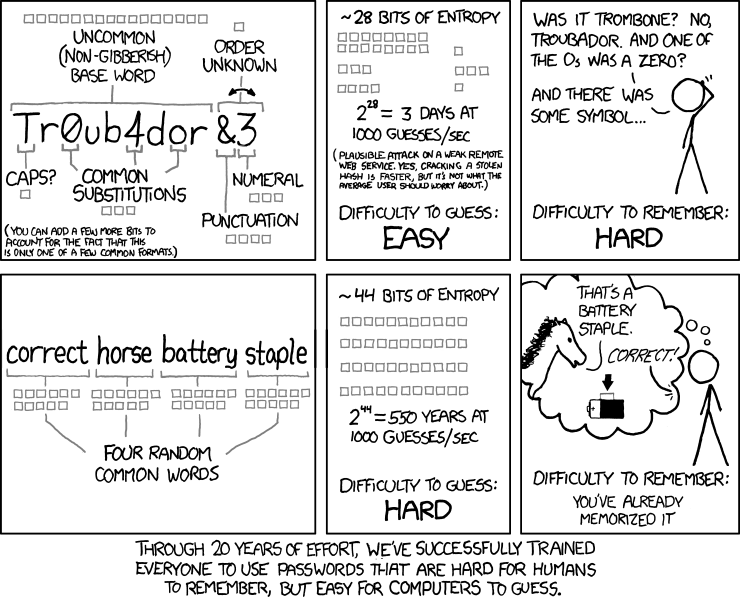
The answer is ‘length’.
Increasing the physical length itself is more effective than increasing the complexity of a password within a limited length.
Let's bring back the example that looked fine at 27 years. That password was '!Kim@Cat#02'.
What if, instead, we drop the uppercase letters and special characters and increase the length of the original 11-character password to 22 characters?
'kimcatwoodskywaterpark' is exactly 22 characters, and the time to hack it comes out to '3,100 years'.
As the total length increases, the number of possible combinations grows ‘exponentially with the length’ ((26^{22}) for 22 characters: the alphabet's size raised to the length), which is far more effective.
Adding uppercase letters and special characters only increases the number of possibilities per character by a dozen or so, whereas raising the exponent from 11 to 22 always gives a bigger number, as long as there are enough characters.
So, increasing the length makes sense, but can you actually memorize such a long password? This is where the next two sections, ‘The Advantage of Another Language’ and ‘Your Own Algorithm’, matter.
The situation on some websites
Even so, some websites still require you to keep your password under 20 characters at sign-up. (NIST's guidelines say sites should accept at least 64.)
An even more ridiculous case is when a site accepts more than 20 characters at sign-up without filtering, but only accepts up to 20 characters at login, so you can't log in at all. A real farce.
I'd like to name those sites, but I'm afraid of being sued, so I won't. A few computer software vendors' homepages and many government ministry homepages are like this.
The Advantage of Another Language
If your first language isn't English, you have one peculiar strength. My example is Korean, but the same goes for any language typed on its own keyboard layout.
Namely, you can avoid the English words that attackers abroad use for dictionary attacks (a technique that, assuming people won't use completely random words, attacks using words that appear in a dictionary).
Even if you really want to use your pet dog's name in a password (and even if that name happens to be the English word ‘choco’, written 초코 in Korean), it's better to write the password as 'chzh', which is what you get by typing 초코 on a Korean keyboard while it's in English mode, than as 'choco'. (Attackers who target a language's speakers know this trick too, so it adds a little, not a lot: length still does the real work.)
A forced comparison
It's a very crude case, but just for a simple comparison, the estimated attack times for ‘choco’ and ‘chzh’ themselves come out to 1.61 seconds vs 22.85 seconds.The surprising part is that 'chzh', which is just the Korean word typed in English mode, is actually one character shorter.
So even if the words you want to use in a password are English words, it's better to write them as you would write their pronunciation in your own language.
(More examples, out of impatience: 'password' -> 'votmdnjem' or ‘qlalfqjsgh’, 'bank' -> ‘qodxm’ or 'dmsgod', etc.)
Your Own Algorithm
Still, if you use the same password on every website, then if a hack succeeds at even one place, or your password is accidentally leaked (e.g., you lose the bankbook with your bank password written in it), you'll be attacked on every site.
That's why creating your own algorithm is very useful. The word ‘algorithm’ might make it sound difficult, but it isn't at all. It even makes passwords, which have become harder to memorize now that they're longer, easier to remember.
Creating an algorithm means setting a rule for when you sign up for a website, or when you're convinced by this post and want to change the passwords of sites you've already joined.
Here's how it goes.
(password for each site) = (my name)#(my favorite animal)#(the city I was born in)#(the name of the site I'm signing up for)
Applied, it looks like this.
With Korean as the language, signing up for Naver (a Korean portal) gives (전우형)#(강아지)#(서울)#(네이버), that is, (my name)#(puppy)#(Seoul)#(Naver).
That looks too easy, doesn't it? But typing the whole thing on a Korean keyboard in English mode gives the following.
wjsdngud#rkddkwl#tjdnf#spdlqj
Special characters
You might say, “Hey, you're using special characters too!” But I'm not against special characters themselves, and they're handy for separating the parts, so feel free to use them.If you have a favorite sequence of digits, inserting the special characters in that order is also a good idea.
For example, someone who often uses 3278 as a password would get something like 'abc#password@example&special*' (the Shift characters on the 3, 2, 7 and 8 keys).
Shall we enter it into the site we used earlier? The estimated time came out as '4 hundred trillion trillion trillion years'.
So, after looking it up, that means it would take '400 * trillion * trillion * trillion years'.
This way, you can easily create a different password for each website. One caution: if a site ever leaks your password in plain text, whoever reads it can see your rule, so keep the parts hard to guess.
So, the Conclusion?
- Making it long is always the way to go.
- If you speak another language, make the most of it.
- You need your own password-generating algorithm.
- The security requirements of some websites must be fixed.
- Better still, where you can: a password manager, and passkeys where a site offers them.